What Is a Franchise ERP? How It Differs and 5 Criteria for Choosing One
The difference between a franchise ERP and a general ERP, plus five selection criteria to check before you adopt one
Franchisor headquarters manage internal operations and franchise stores at the same time
Key takeaways
A franchise ERP is a business system built for headquarters that manages sales, contract, opening, operations, inspection and revenue data between headquarters and franchise stores as a single flow. Where a general ERP focuses on managing internal company resources, a franchise ERP exists to run stores that headquarters doesn't own against standardized criteria.
When evaluating one, check whether headquarters' business data connects without breaks before counting features.
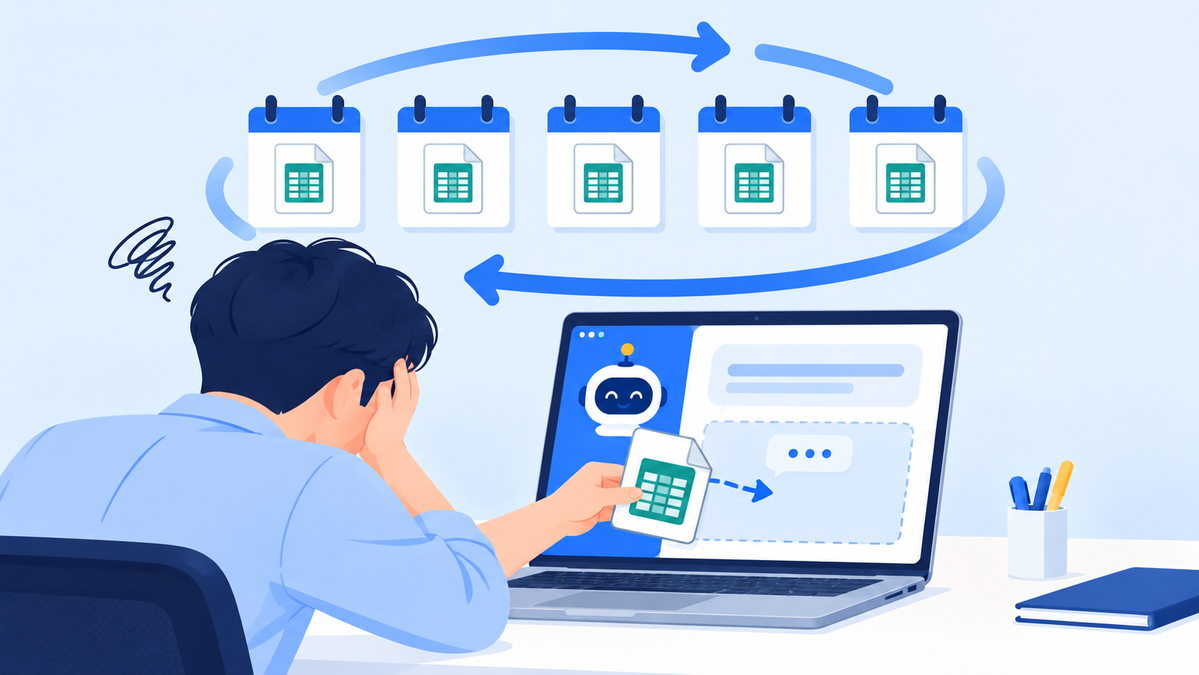
Many headquarters find that as their store count grows, so does the number of spreadsheets they have to manage. Consultation history sits on a staff member's PC, opening progress in a group chat, and sales in the POS.
So they start looking into franchise ERPs, only to find that every vendor's feature list looks about the same. This article explains how a franchise ERP differs from a general ERP and what criteria to use before adopting one.
What is a franchise ERP, and how is it different from a general ERP?
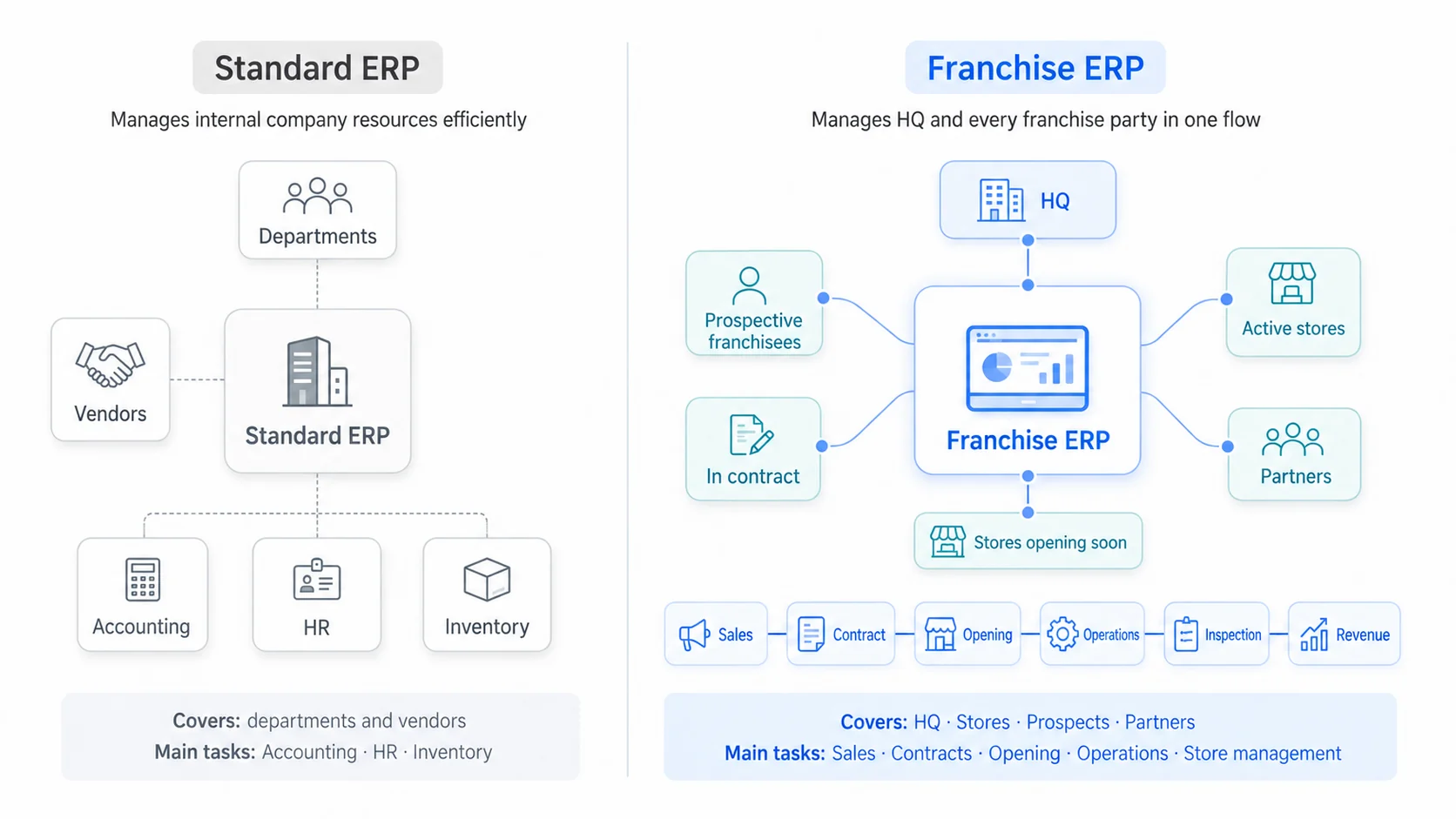
The two systems manage fundamentally different things
A franchise ERP is a business system built for headquarters that manages sales, contract, opening, operations, inspection and revenue data between headquarters and franchise stores as a single flow. If a general ERP is a tool for using one company's internal resources efficiently, a franchise ERP is a tool for running stores headquarters doesn't own, with owners it doesn't employ, against standardized criteria.
That difference is bigger than it sounds. A franchisor headquarters doesn't deal only with internal departments. It also deals with prospective owners, franchise applicants mid-contract, stores preparing to open, franchise stores already in operation and business partners. Each of them is at a different stage and needs different information.
| Category | General ERP | Franchise ERP |
|---|---|---|
| Who it manages | Internal departments and vendors | HQ, stores, prospective owners, partners |
| Core work | Accounting, HR, inventory | Sales, contracts, openings, operations, store management |
| Key data | Internal company data | Operating data for every store in the brand |
| Main goal | Internal efficiency | Store expansion and standardized operations |
Many headquarters still have their franchise division working in spreadsheets even after adopting a general ERP. It isn't that general ERPs fall short; the things to be managed and the nature of the data are different from the start. That's also why these systems go by names like franchisor ERP or franchise store management system. It's the point MS Benter confirmed again and again while building systems for more than 500 brands.
What does headquarters miss when running on spreadsheets and standalone programs?
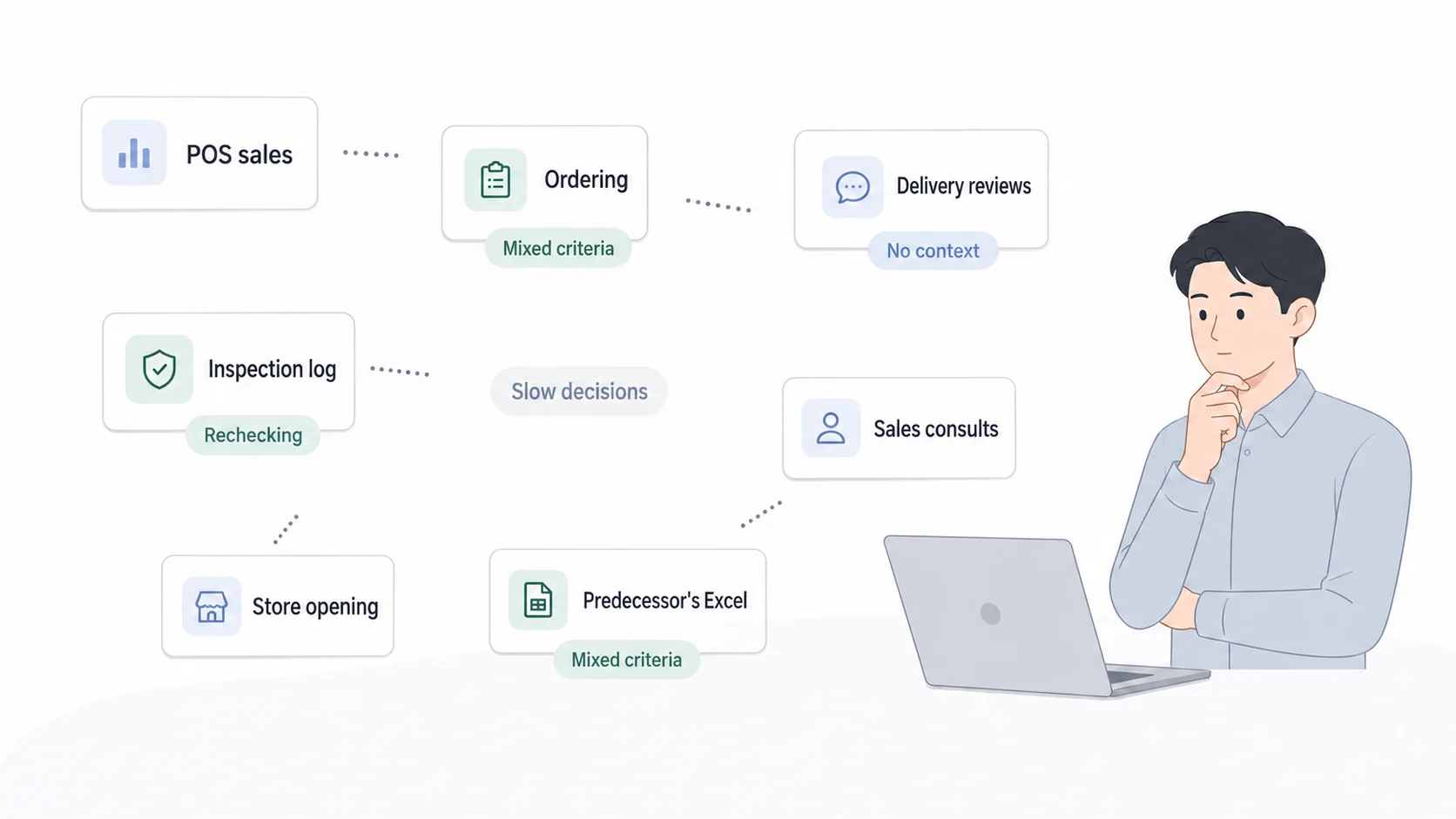
Where data breaks, headquarters' decisions slow down
It isn't that spreadsheets are inconvenient. The problem is that wherever data breaks, headquarters makes decisions more slowly.
Sales consultation records are scattered by staff member
Sometimes no one realizes the same prospective owner inquired with two different staff members. And you only find out which acquisition channels actually produce contracts after compiling everything at year-end.
It's hard to see opening progress after signing in real time
When paperwork, interiors and training each sit with a different person, headquarters has to ask around to find out which stage a store is stuck at.
No history of store inspections and corrective action requests
There's no way to check whether an issue flagged last quarter is recurring, or whether action was actually taken after a corrective action request.
POS, delivery and logistics data don't connect
You check sales in the POS, orders in a separate system and reviews on delivery platforms. Signals that only appear when you look at all three together get missed.
Every report means compiling data all over again
Rebuilding the same numbers every month takes time, and in the meantime each person's criteria drift slightly apart.
When staff change, their know-how leaves with them
The predecessor's spreadsheets may remain, but the reasons they managed them that way do not.
These problems ultimately lead to slow decisions, missed and duplicated work, uneven quality in how stores are supported, and difficulty understanding profitability by brand and by store. It isn't that the data doesn't exist; it's piling up in a form that can't be used for analysis.
Take a moment to check the items below
- Prospective owner consultation history is saved in staff members' personal files
- To know opening progress, you have to ask the person in charge directly
- It's hard to check whether issues flagged in the last inspection were fixed
- Sales, orders and reviews are each checked on different screens
- Monthly reports require compiling data all over again
- You've missed a store whose contract was about to expire
If three or more apply, the problem isn't a lack of software. It's time to review how your data connects.
Five criteria to check when choosing a franchise ERP
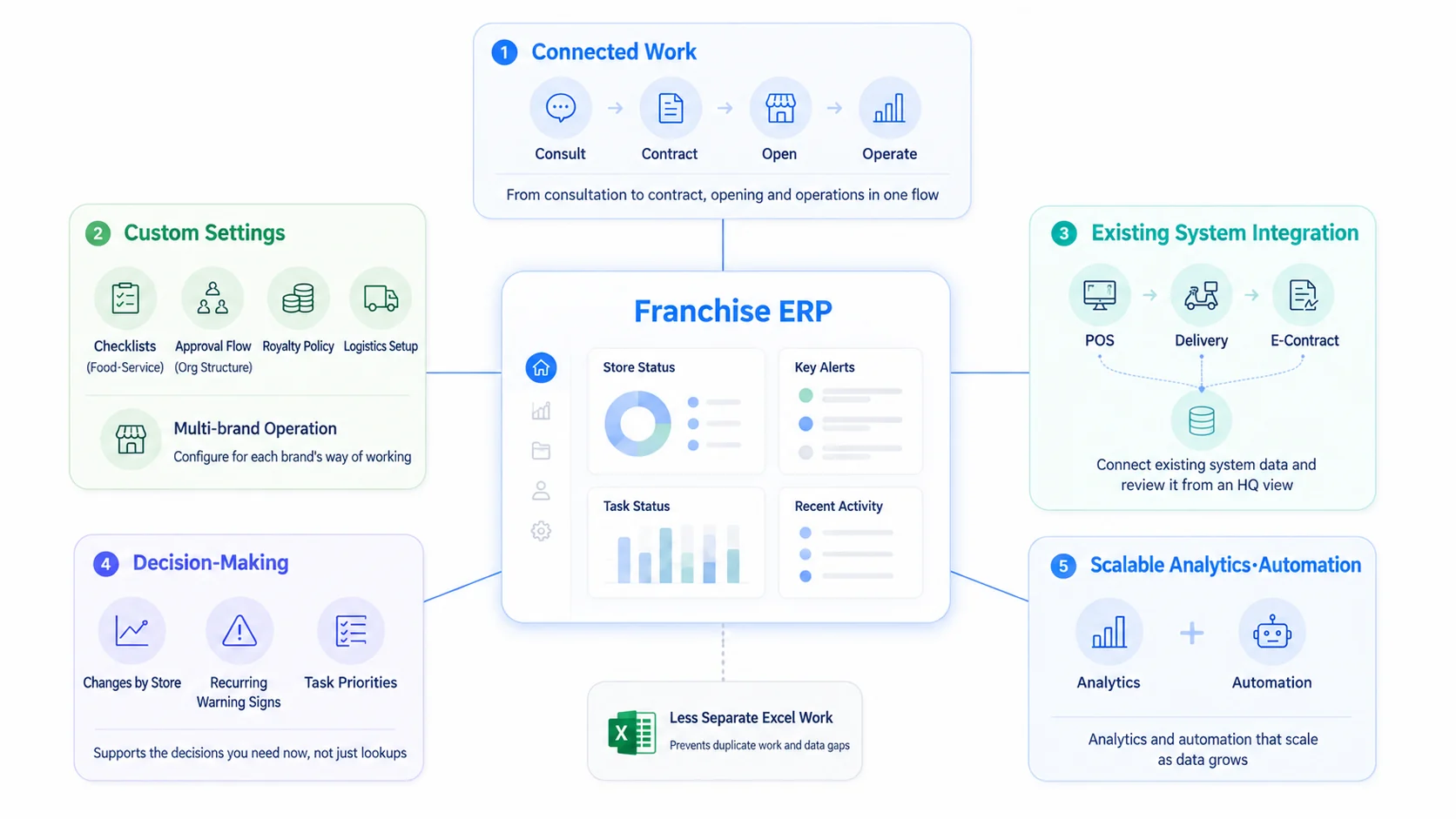
Five criteria to check before the feature list
1Can it connect all of headquarters' work?
A tool that offers only sales management or only logistics ends up as just another standalone program. First check whether it runs as one flow from consultation through contract, opening and operations. In particular, it matters whether contract information carries over naturally into opening preparation items, and opening information into operations management.
2Can it be configured to fit each brand's way of operating?
Food service and service businesses inspect different items, and approval flows differ by headquarters' organizational structure. To fit real work, you need to be able to adjust settings for royalty policies, logistics structure and whether you run multiple brands. With a solution that offers only standard features, you'll end up building separate spreadsheets again after adoption.
3Can it connect with your existing POS, delivery and e-contract systems?
Replacing every system you already use isn't realistic. What matters is whether it can pull in data from existing systems and present it from headquarters' perspective. A program that only works on its own breaks your data apart once again.
4Can you use the data for decisions, not just reports?
A system that only looks things up and prints them merely takes the place of spreadsheets. Look at whether it surfaces changes by store, recurring anomalies and which tasks to check first right now.
5Can analysis and automation scale as data grows?
As your store count grows, so do both the volume and the variety of data. Don't just look at the features you need today; check whether the structure can support analysis and automation features down the road.
A good franchise ERP doesn't stop at digitizing current work. So that the system can eventually interpret data and suggest needed tasks proactively, the shape of the data and the relationships within it must be designed systematically from the start.
How do headquarters' decisions change once operating data is connected?
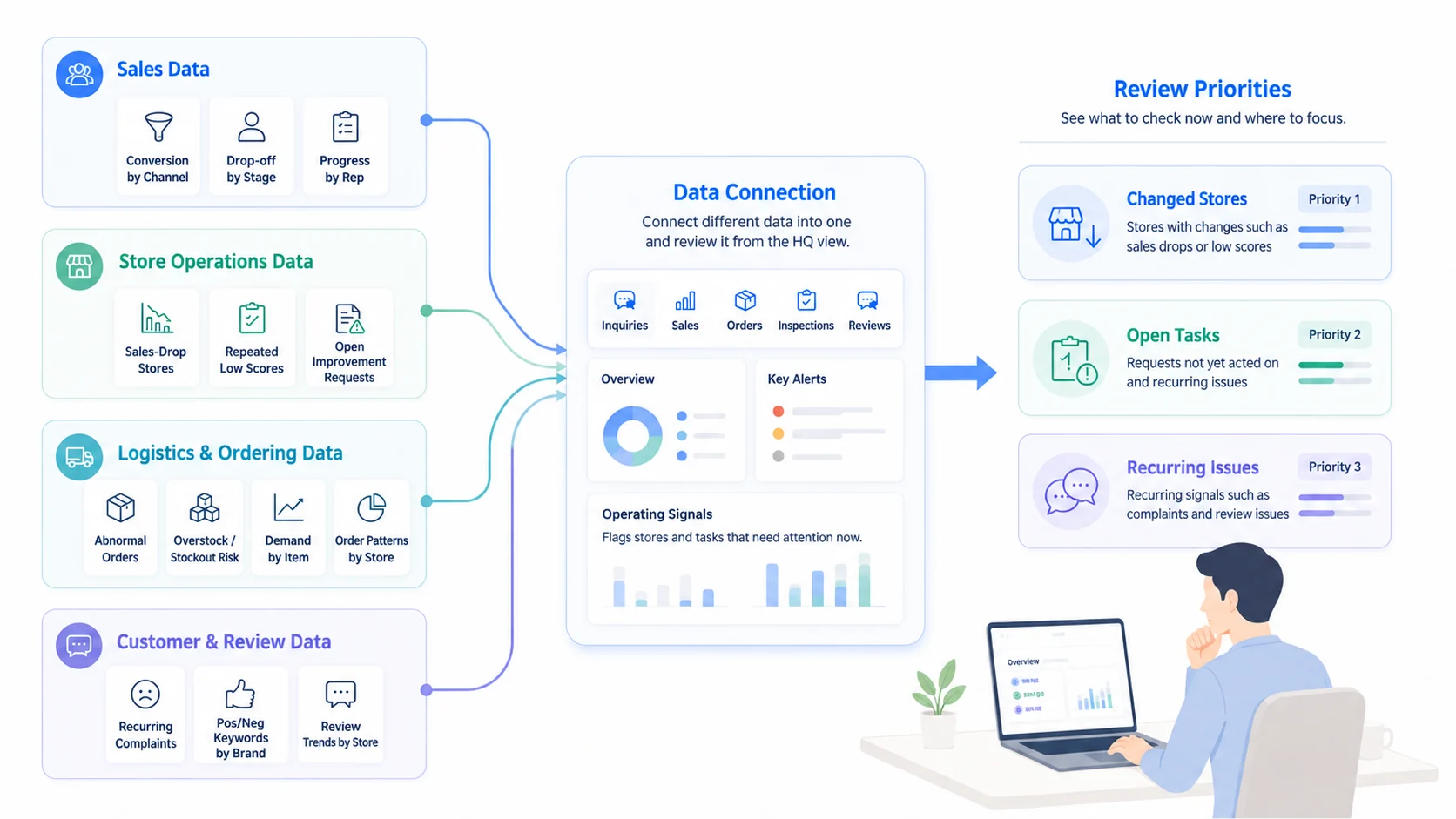
Operating signals emerge when you look at different data together
Once data is connected, headquarters sees "what needs checking now" first, rather than "what happened last month."
In sales data, you can see contract conversion rates by acquisition channel, drop-off points by consultation stage and progress by staff member. It becomes clear which channels generate plenty of inquiries but few contracts, and at which stage prospective owners drop out.
In store operating data, stores with sharp sales declines, stores with repeatedly low inspection scores and items left unaddressed after corrective action requests stand out. You can prioritize which stores need support.
In logistics and ordering data, you can see unusual order volumes, risks of overstock and stockouts, shifts in demand by item and differences in ordering patterns between stores. This area is handled by logistics ERPs and order management systems, and viewing it alongside headquarters' operating data widens the range of interpretation.
In customer and review data, you can spot recurring complaints, positive and negative keywords by brand and review trends by store. Headquarters can identify issues it needs to address before individual stores do.
Once operating data accumulates against consistent criteria, the system can go beyond showing past performance and help pinpoint stores where something has changed and tasks that need attention.
What matters isn't the number of AI features, but whether headquarters' business data is connected in a form AI can understand. Only when you interpret different data together, such as consultation records, sales, orders, inspections and reviews, do the operating signals headquarters has been missing come into view.
How does FDAM connect franchisor headquarters' work and data?
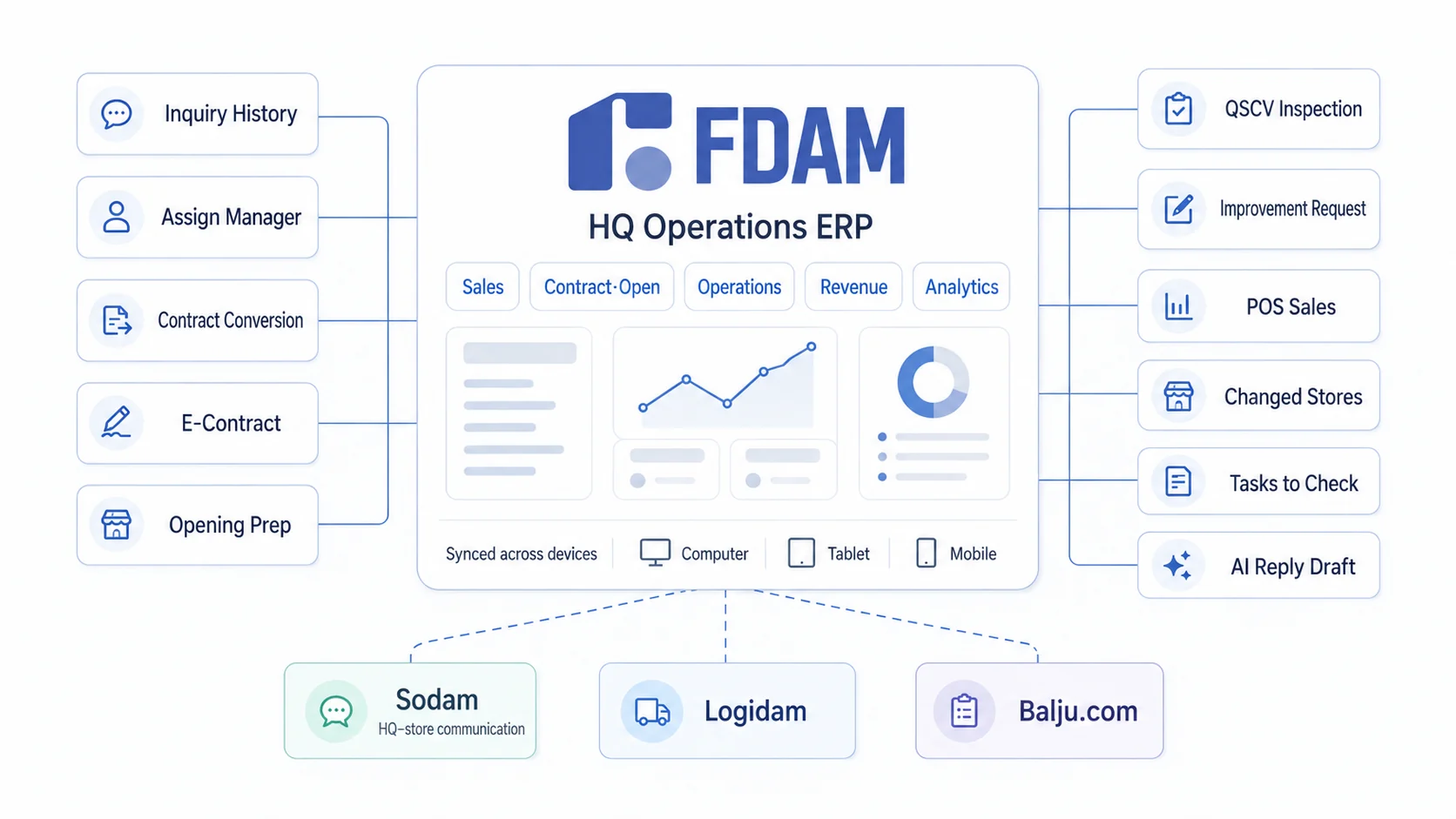
From consultation to operations, everything flows as one stream of data
FDAM is an HQ operations ERP designed around the workflow of franchisor headquarters. Rather than listing features one by one, let's walk through them in the order headquarters actually works.
1Prospective owner consultations and sales management
From inquiry intake to consultation history, staff assignment, progress stage and contract conversion status, everything continues within sales management. Where a lead came from and which stage it's sitting at are kept as headquarters data, not in someone's personal file.
2Contracts and store openings
Contracts proceed through pre-disclosure documents and e-contracts, after which headquarters manages paperwork, interior and training preparation step by step in opening management. Headquarters can see on one screen which items are still incomplete for which store. The e-contract module includes an automatic alert 30 days before a contract expires, helping you avoid missing renewal dates.
3Franchise store operations management
Store visits, QSCV inspections, corrective action requests and store information management all happen in operations management. As inspection history builds up, you can see recurring issues and whether they were fixed. CS management, survey management and dispute management can be added as options as needed.
4Sales data management
POS sales aggregation lets you review each store's performance by headquarters' standards. You can compare stores within the flow of the whole brand, not just as individual numbers.
5Data analysis and work support
Based on accumulated operating data, it distinguishes stores where something has changed and tasks that need attention. For delivery reviews, AI generates draft replies to lighten the writing load on staff.
On top of this, communication between headquarters and stores continues in the Sodam app. Notices, recipes, surveys, CS and QSCV on-site inspections move both ways between headquarters and stores, so you can even confirm whether what headquarters sent actually reached the store. Logistics and order management are handled by Logidam and Balju.com, which can be configured together as needed.
FDAM doesn't provide each feature separately. It connects headquarters' work, from recruiting franchisees through contracts, openings and operations, into a single flow of data. Connected data like this isn't only for building reports. It becomes the foundation for headquarters to spot changes in stores faster and for staff to sort out which tasks to check now.
It works across PC, tablet and mobile, so records from the office and the field stay connected, which is something teams notice in day-to-day work.
Frequently asked questions before adopting a franchise ERP
At how many stores does a franchise ERP become necessary?
The trigger is the point when information starts to scatter, not the store count. If two or more staff members are each managing consultation, contract, opening and inspection information on their own, your data has already started to break. Adopt after your store count grows, and the data you need to migrate grows with it.
Can it be used alongside our existing POS or accounting software?
Yes. Each system keeps its role, and the necessary data is integrated. The accounting system handles accounting and the POS handles in-store payments, while the franchise ERP reorganizes that data from headquarters' operating perspective. Which data to integrate, and how far, is worked out during the sales consultation.
How long does it take to implement a franchise ERP?
It depends on the scope of headquarters' work, how much existing data needs migrating and whether external systems are integrated. Typically it goes through business analysis and requirements gathering, configuration and data migration, staff training, a pilot run and full launch. The better organized your existing data, the shorter the timeline.
How is a logistics ERP different from a franchise ERP?
A logistics ERP manages the flow of goods, centered on purchasing, inventory, shipping and ordering. A franchise ERP manages the workflow between headquarters and stores, from franchise sales through contracts, openings and operations. Since the two serve different purposes, the usual setup is to keep separate systems and link them where needed.
What's different about a franchise ERP with AI features?
How accurately and consistently data has been accumulated matters before the number of AI features. If consultation, inspection, sales and review data are scattered under different standards, analysis becomes less accurate. Analysis and automation become meaningful on top of a connected data structure.
What matters more than how many spreadsheets and programs you use today is whether the data inside them is connected.
Since its founding in 2007, MS Benter has been moving the work of franchisor headquarters into software. FDAM is an HQ operations ERP built on the understanding of that work accumulated over the years.
We'll review it with you, starting
from where your data breaks
In a sales consultation, we diagnose your current headquarters workflow
and recommend the setup you need.
FDAM product overview KakaoTalk inquiry 1544-7120
Product information
MS Benter (MSBENTER) Software developer specializing in franchises
FDAM HQ operations ERP for franchisors · Sales management / Opening management / Operations management / AI assistant / QSC management / Franchise e-contracts / Store training management / Certified-mail notice management / CS management / Survey management
Sodam Two-way communication app between HQ and stores
Logidam Franchise logistics ERP
Balju.com Franchise order management app (linked with Logidam)
Franchise ERP, franchisor ERP, franchise store management software, franchise store management system, franchisor headquarters solution, FDAM, Fdam, MS Benter, e-contracts, QSCV inspections, POS sales aggregation, franchise system